Introduction
Modern identity systems rely on standardized protocols to handle authentication and authorization. The three most important protocols you’ll encounter are OAuth 2.0, OpenID Connect (OIDC), and SAML. Understanding when to use each is crucial for building secure applications.
OAuth 2.0: Authorization Framework
OAuth 2.0 OAuth 2.0 is the industry-standard framework for delegated authorization, allowing third-party applications to access user data (e.g., Google Drive, Facebook) without exposing passwords. It works by issuing access tokens to applications via specific flows, such as Authorization Code or Client Credentials, enabling secure, limited access to resources.
What OAuth 2.0 Is
- An authorization protocol (not authentication!)
- Designed for delegated access
- Uses access tokens to grant permissions
OAuth 2.0 terminology
- Resource Owner: Entity that can grant access to a protected resource. Typically, this is the end-user.
- Client: Application requesting access to a protected resource on behalf of the Resource Owner.
- Resource Server: Server hosting the protected resources. This is the API you want to access.
- Authorization Server: Server that authenticates the Resource Owner and issues Access Tokens after getting proper authorization.
- User Agent: Agent used by the Resource Owner to interact with the Client (for example, a browser or a native application).
OAuth 2.0 Grant Types
- Authorization Code: Most secure, used for web/mobile apps where users log in and grant permissions.
- Client Credentials: Used for server-to-server communication where no user is involved.
- Device Code: For devices without browsers
- Refresh Token: Obtain new access tokens without re-authentication
Useful Resources for Authorization Code Flow
- OAuth 2.0 Authorization Code Flow - Video Tutorial 1
- OAuth 2.0 Authorization Code Flow - Video Tutorial 2
- OAuth 2.0 Playground - Authorization Code
OAuth 2.0 Authorization Code Flow Example
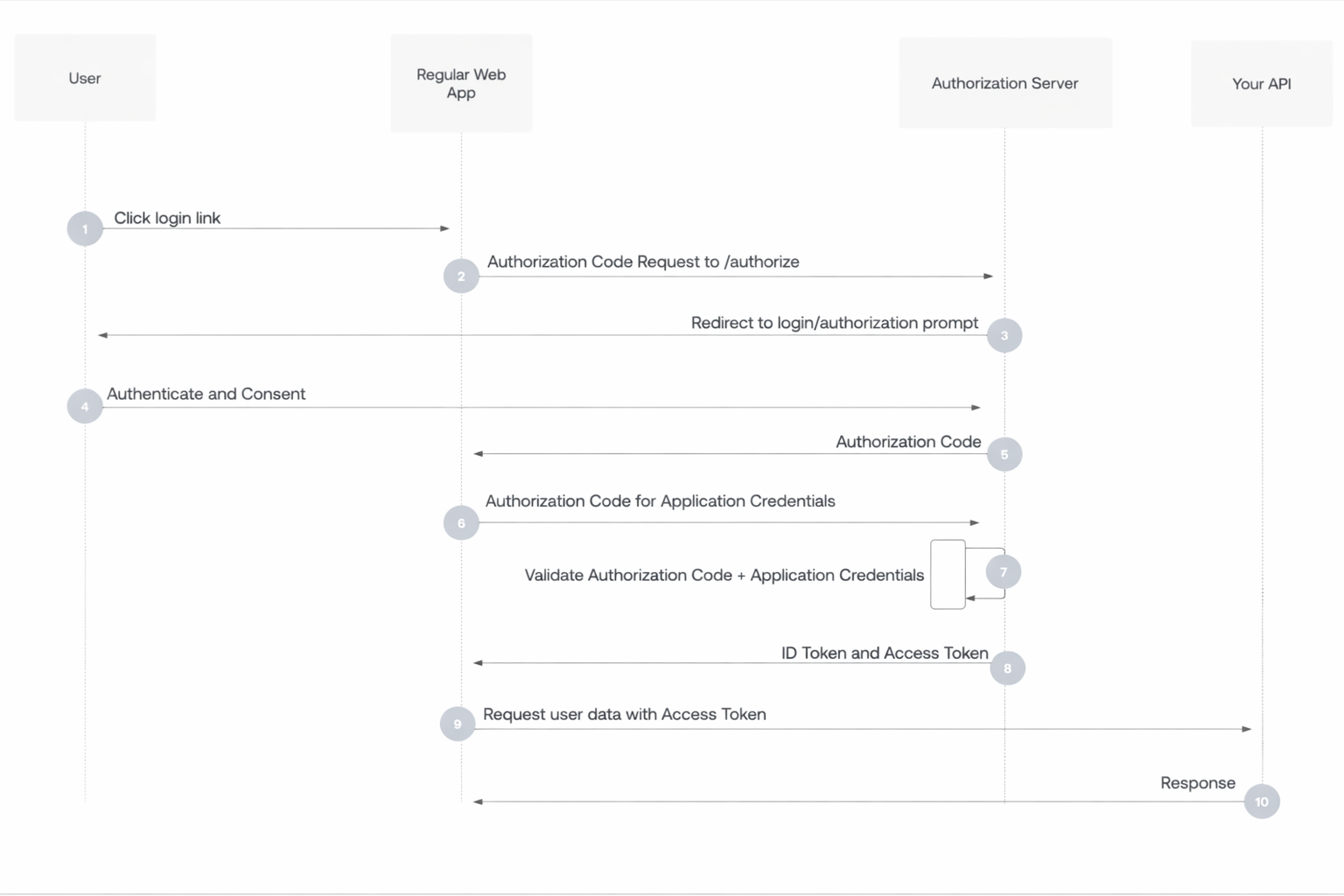
- User selects Login within application.
- Authorization Server’s in the application SDK redirects user to Authorization Server (/authorize endpoint).
- Authorization Server redirects user to login and authorization prompt.
- User authenticates using one of the configured login options, and may see a consent prompt listing the permissions the Authorization Server will give to the application.
- Authorization Server redirects user back to application with single-use authorization code.
- Authorization Server’s SDK sends authorization code, application’s client ID, and application’s credentials, such as client secret or Private Key JWT, to Authorization Server (/oauth/token endpoint).
- Authorization Server verifies authorization code, application’s client ID, and application’s credentials.
- Authorization Server responds with an ID token and access token (and optionally, a refresh token).
- Application can use the access token to call an API to access information about the user.
- API responds with requested data.
When to Use OAuth 2.0
Use OAuth 2.0 whenever an application needs delegated, limited, and secure access to resources owned by a user or another system without sharing credentials.
Typical situations:
Third-party app access to user data When your app needs to access data from another service on behalf of a user. Examples:
- “Sign in with Google” and access profile/email
- A calendar app accessing Google Calendar
- A photo printing app accessing Google Photos
API protection When you expose an API and want controlled access. OAuth gives you:
- Token-based security
- Scope-based permissions
- Expiration and revocation
Single Sign-On (SSO) OAuth combined with OpenID Connect is the standard for modern SSO systems. Use when:
- You want centralized login
- Multiple apps share the same identity provider
- You need identity + authorization
Mobile and SPA authentication For native mobile apps and browser SPAs:
- Use OAuth 2.0 Authorization Code Flow with PKCE
- Avoid storing secrets in the client
- Industry standard pattern
Machine-to-machine communication When services need to talk to each other without a user. Use:
- Client Credentials Flow Examples:
- Backend service calling another internal API
- CI/CD system calling deployment APIs
Fine-grained permissions When different operations need different privileges, OAuth scopes give you this control.
Token lifecycle control Use OAuth if you need:
- Short-lived credentials
- Token rotation
- Revocation
- Auditing and traceability
When not to use OAuth 2.0:
- Simple username/password login for a single app with no external integrations
- Internal systems with no need for delegation or tokenization
- When no third-party or API access is involved
Rule of thumb:
Use OAuth 2.0 if any of these are true:
- You have APIs
- You integrate with external services
- You want SSO
- You need delegated access
- You need token-based security
- You need scalable authorization
OpenID Connect (OIDC): Authentication Layer
OIDC is an identity layer built on top of OAuth 2.0. It extends OAuth 2.0 to provide authentication.
What OIDC Adds
- ID Token: JWT containing user identity information
- UserInfo Endpoint: Standard way to get user profile data
- Standard claims: email, name, picture, etc.
OIDC Tokens Sample
{
  "iss": "https://accounts.example.com",
  "sub": "alice@example.com",
  "aud": "your-client-id",
  "exp": 1735228800,
  "iat": 1735225200,
  "name": "Alice Smith",
  "email": "alice@example.com"
}
When to Use OIDC
- Single Sign-On (SSO) for modern applications
- Mobile and web app authentication
- Microservices identity propagation
- Consumer applications with social login
SAML: Enterprise Federation
SAML (Security Assertion Markup Language) is an XML-based protocol primarily used for enterprise SSO.
What SAML Provides
- XML-based assertions
- Enterprise SSO
- Strong support in legacy systems
- Rich attribute exchange
SAML Flow
User → Service Provider (SP) → Identity Provider (IdP) → IdP authenticates → SAML assertion → SP grants access
When to Use SAML
- Enterprise SSO requirements
- Legacy application integration
- Compliance requirements (HIPAA, SOC 2)
- B2B integrations
Comparison
| Feature | OAuth 2.0 | OIDC | SAML |
|---|---|---|---|
| Purpose | Authorization | Authentication | Authentication |
| Format | JSON | JSON (JWT) | XML |
| Mobile Support | Excellent | Excellent | Limited |
| Complexity | Medium | Medium | High |
| Use Case | API access | Modern apps | Enterprise SSO |
Choosing the Right Protocol
Use OAuth 2.0 when:
- You need API authorization
- Building third-party integrations
- Implementing delegated access
Use OIDC when:
- You need authentication for modern apps
- Building consumer-facing applications
- Implementing SSO for web/mobile
Use SAML when:
- Required by enterprise customers
- Integrating with legacy systems
- Meeting specific compliance requirements
Common Misconceptions
- “OAuth 2.0 is for authentication”: No, it’s for authorization. Use OIDC for authentication.
- “SAML is outdated”: It’s still widely used in enterprises
- “You can’t use multiple protocols”: Many systems support both OIDC and SAML
Best Practices
- Use OIDC for new applications unless SAML is required
- Always validate tokens properly
- Use proven libraries rather than implementing from scratch
- Keep up with protocol updates and security advisories
- Consider your audience (consumers vs enterprises)
Next Steps
Understanding protocols is essential, but so is knowing the different types of identities: User vs Workload Identities.